

The Problem That Started It All
You know how it goes—your kids discover Minecraft ( or another games) , and suddenly every spare moment disappears into mining, crafting, and building. For my children, it started innocently enough on Roblox, playing Minecraft clones where their creations would get destroyed by other players. So I did what any developer-parent would do: I set up our own Minecraft Java server.
Download the server JAR (Minecraft Server Download | Minecraft), fire it up with Eclipse Adoptium JRE (or any other JRE supported version), tweak the server.properties file, and boom—a safe creative space where the kids could build, explore, and destroy to their hearts’ content. Problem solved, right?
Not quite.
When Creative Freedom Meets Time Management Reality
The server worked beautifully. Too beautifully. All my children loved it, but my 5-year-old son became particularly absorbed—he found every possible gap in the schedule to squeeze in “just five more minutes” of mining. Google Family Link helped a bit, but he’s a resourceful kid—he figured out the desktop computer wasn’t protected and migrated to the 27″ LCD setup with a proper mouse and keyboard.
Then the new Minecraft movie dropped, and suddenly this wasn’t just a minor concern anymore. My wife started highlighting the screen-time issue more frequently (read: daily). The writing was on the wall—I needed a real solution that could manage time fairly across all the kids while keeping the peace at home.
The Solution: A Custom Time Management System
Instead of fighting with generic parental controls that felt clunky and didn’t integrate with our server, I decided to build something purpose-built. The goal was simple: create a time management tool that actually understands Minecraft, works with our server setup, and gives us real control without being a hassle to use.
Like any good software project, it went through the usual alpha-beta-gamma phases. The first version could barely track playtime and boot players home when they wandered too far. But then I did something smart—I asked my son to help me understand all the possible scenarios and commands he used in-game. Kids are excellent QA testers when they don’t know they’re testing.
The Architecture: Flask + RCON + Docker
This project is open source and available on my GitHub. If you’re dealing with similar parental-control challenges or just want to add better management to your Minecraft server, check it out and contribute your own improvements.
The system I built combines a Flask web application with Minecraft’s RCON (Remote Console) protocol, all packaged in Docker for easy deployment. Here’s how the pieces fit together:
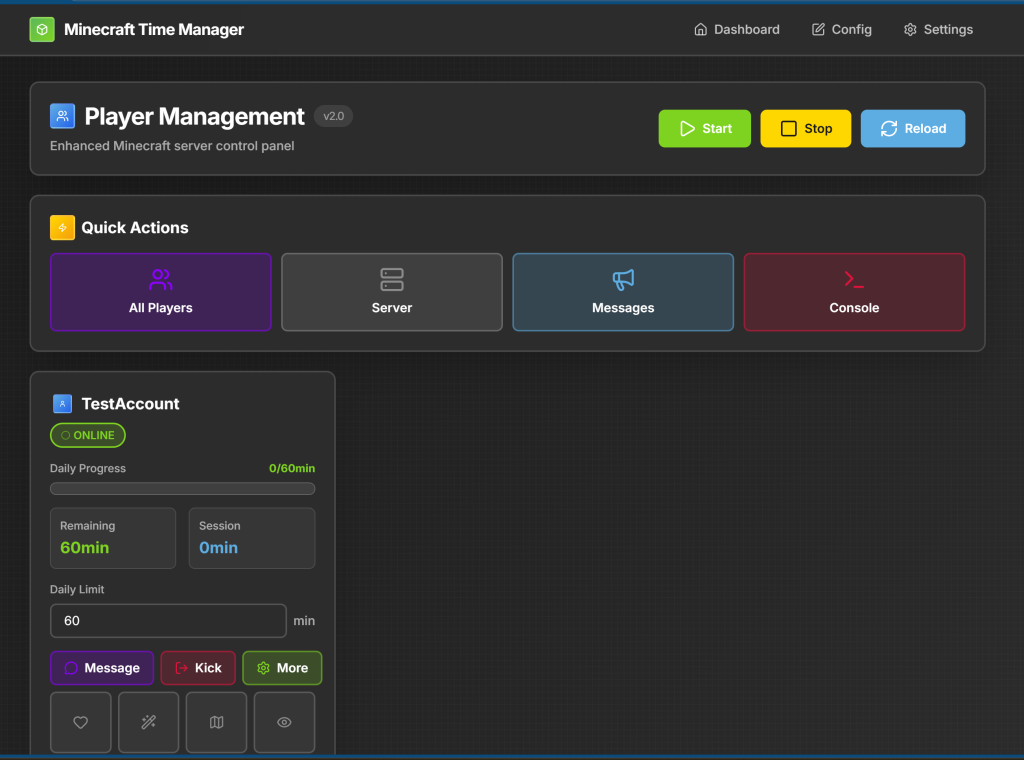
Web Interface: A clean, responsive dashboard where I can see who’s playing, for how long, and execute commands without touching the server console.
Flask Backend: Handles all the routing, command processing, and configuration management. It’s the brain of the operation.
RCON Client: The bridge between our web interface and the Minecraft server. Every command, every player check, every warning message flows through this connection.
SQLite Database: Tracks player sessions, time limits, and historical data. Simple, reliable, no overhead.
JSON Configuration: All the custom commands, items, and settings live in a JSON file that’s editable through the web interface. No code changes required.
How It Actually Works
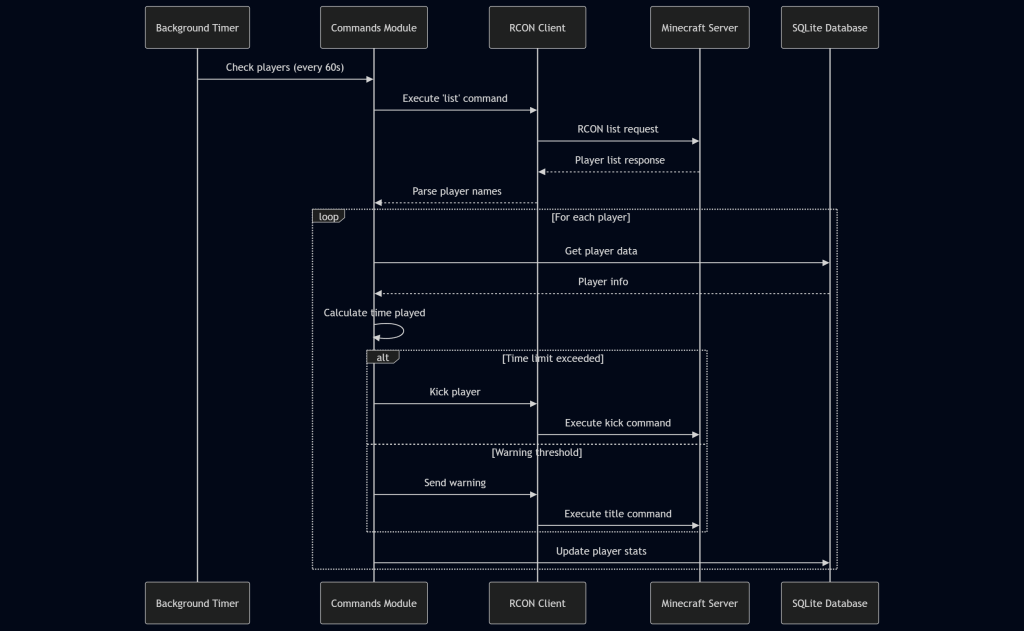
Every 60 seconds, a background timer queries the Minecraft server for active players. For each player online, the system:
- Checks their total time played today against their limit
- Calculates remaining time
- Sends in-game warnings when they’re getting close
- Automatically kicks them when time’s up (with a nice message, of course)
The beauty is in the RCON integration—everything happens in real-time, and players get visual feedback through Minecraft’s title command system. No jarring disconnects, just gradual warnings and clear communication.
Custom Commands and Flexibility
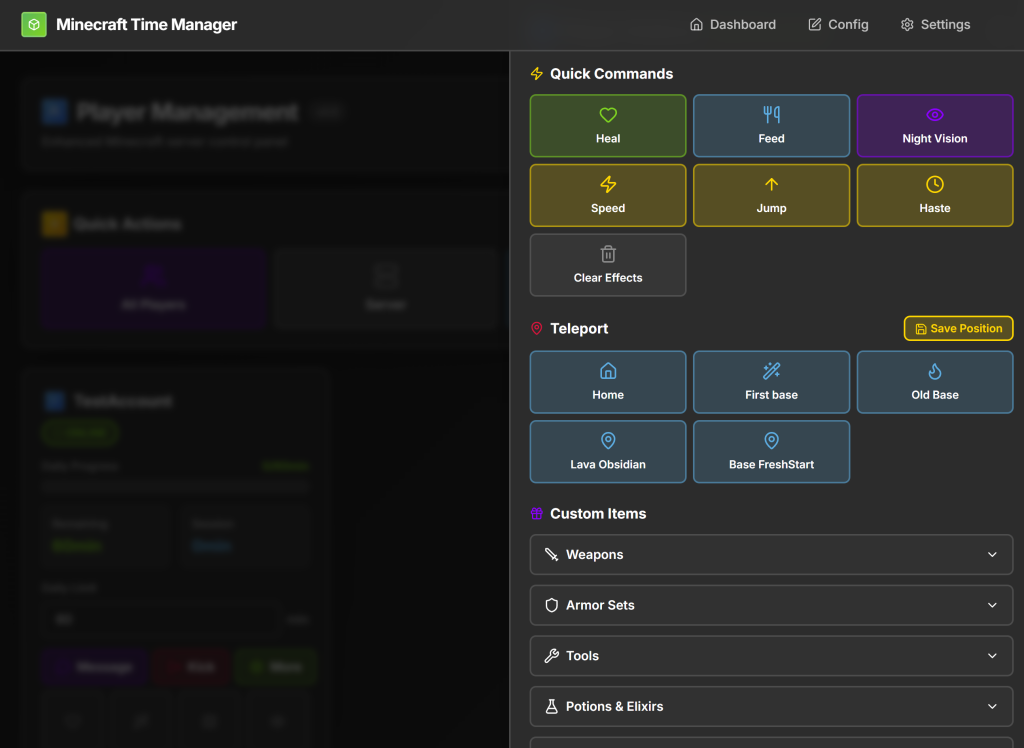
One of the features I’m most proud of is the custom command system. Through the web interface, I can:
- Give enchanted items to players
- Teleport them to saved positions
- Change game modes
- Execute multi-step command sequences
- Send custom messages
All of this is configurable without touching code. The config editor lets me add new items, modify commands, and adjust everything through a clean web UI. When one of my kids discovers a new need or wants different permissions, I can accommodate them in minutes.
The Docker Advantage
Initially, this ran as a standalone Flask app alongside the Minecraft server. But containerizing everything with Docker made deployment and management dramatically easier:
- One
docker-compose upand everything’s running - Environment variables handle all the sensitive config
- Port management is clean and predictable
- Backup and migration became trivial
The Minecraft server and the management tool run in separate containers but communicate seamlessly through RCON. It’s the kind of setup that feels complex when you’re building it but obvious once it’s done.
Real-World Results
Since deploying this system, screen time battles with my kids and wife have dropped to near zero. Each child knows exactly how much time they have, they get clear warnings, and accept the automatic kicks without argument (well, mostly). My wife is happy, the kids are happy, and I get to keep my developer-parent credentials intact.
More importantly, I learned a ton about:
- RCON protocol implementation
- Real-time monitoring systems
- Building interfaces that non-technical users actually want to use
- Docker networking between containers
- Balancing flexibility with simplicity in configuration
Coming in Part 2: We’ll dive deep into the code—the RCON client implementation, the background monitoring loop, the custom command parser, and how the configuration system works. Plus, I’ll share the gotchas I encountered and how to deploy this yourself.
This project is open source and available on my GitHub. If you’re dealing with similar parental-control challenges or just want to add better management to your Minecraft server, check it out and contribute your own improvements.
Leave a Reply